The Solver – Turn Problems into Clear Action Steps
The Solver is one of the core features of Sanotask. Since Sanotask is designed as a goal-getter productivity system, the Solver helps users move beyond simple task tracking and focus on solving real problems that prevent progress.
Instead of only listing tasks, the Solver allows you to clearly define a challenge and use AI assistance to discover practical solutions and next steps.
How the Solver Works
To use the Solver, start by defining a goal or problem you want to solve.
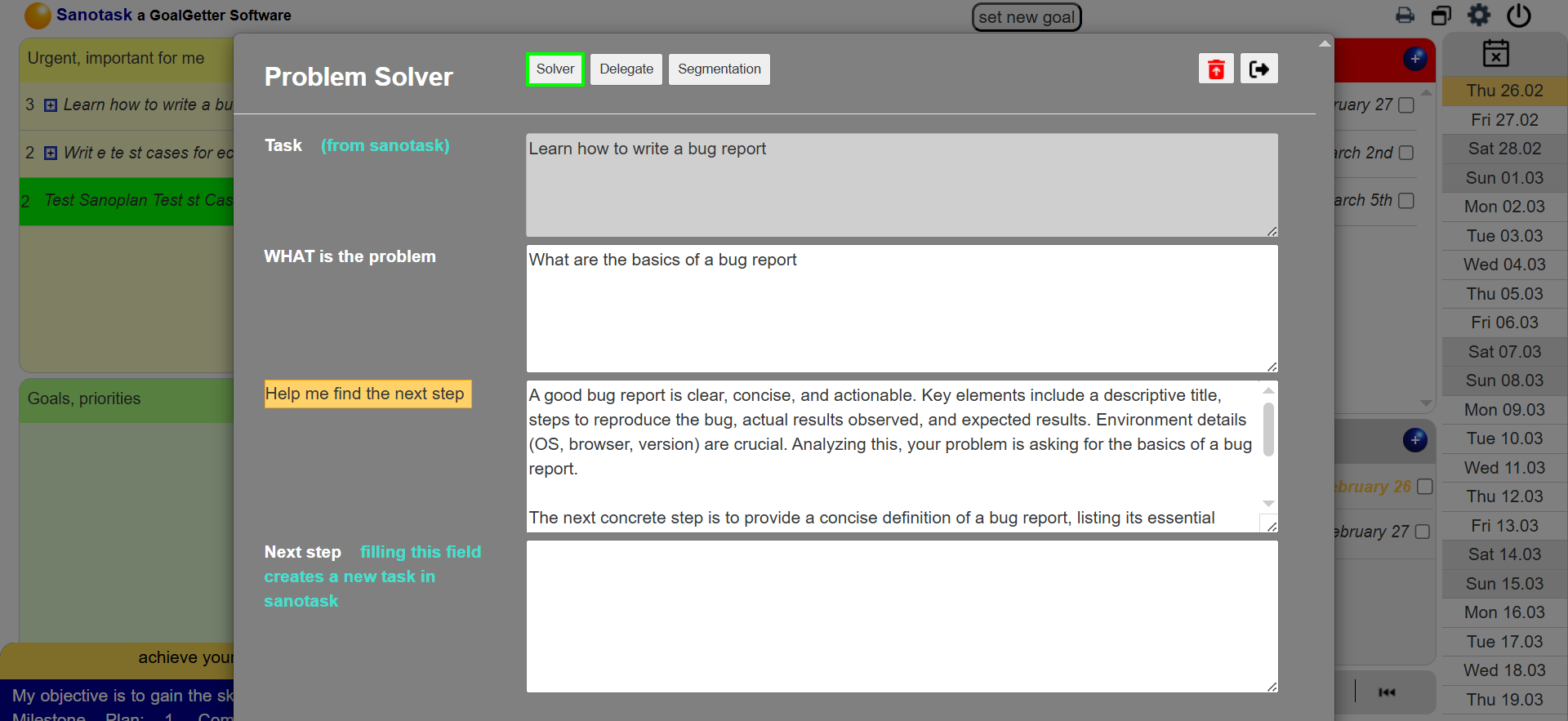
- Write the Problem: Describe the issue or goal you want to improve.
- Analyze the Situation: Explain why the problem exists or what is blocking progress.
- Use AI Assistance: The AI-powered tool can help generate ideas and suggestions to identify possible causes.
- Define the Next Step: Write the action that should be taken to solve the problem.
Once saved, the Next Step automatically becomes a new task in your dashboard, ensuring that every solution turns into an actionable step.
Accessing the Solver
The Solver can be opened by clicking the flash icon inside the orange ball within a task. This opens the problem-solving interface where you can document your analysis and define the next action.
From Thinking to Action
The Solver helps transform ideas into structured execution. By connecting problem analysis with task creation, Sanotask ensures that solutions are not just discussed but actually implemented.
This makes Sanotask more than a task manager, it becomes a decision-support and productivity system that helps users continuously improve their work and achieve their goals.