
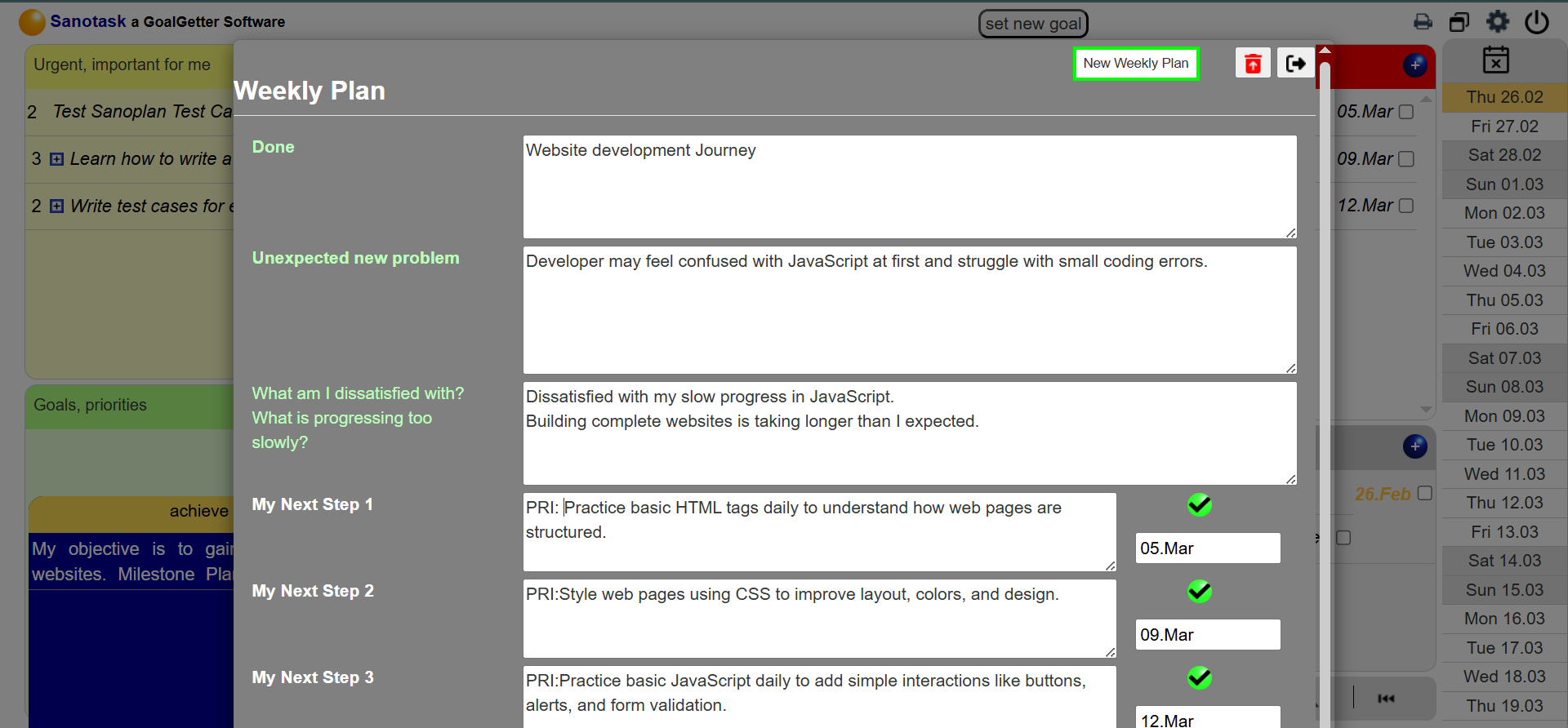
Weekly Plan – Turn Goals into Weekly Action Steps
The Weekly Plan feature in Sanotask helps you convert your goals into clear and actionable weekly steps. After setting a goal, you can create a structured weekly plan that breaks the goal into smaller tasks that can be completed during the week.
This feature ensures that your long-term goals are supported by practical actions, helping you stay focused and make steady progress.
Create a Weekly Plan
Once a goal is set, you can create a weekly plan by defining three key steps that will help you move closer to your objective.
- Step 1 – First action needed to move forward
- Step 2 – Next improvement or development step
- Step 3 – Final step for the week to strengthen progress
Each step you enter automatically becomes a new task on your dashboard.
Priority Tasks Automatically Created
Tasks created from the Weekly Plan are automatically marked with a red “PRI” label, which indicates that they are priority tasks connected to your main goal.
This helps you easily identify the most important work that should receive your attention during the week.
Managing Weekly Plans
You can create a new weekly plan anytime using the “New Weekly Plan” button.
- When a new weekly plan is created, the previous weekly plan disappears from the planner.
- However, the tasks created from previous plans remain in your dashboard until they are completed.
This ensures that no work is lost while allowing you to keep planning week by week.
Stay Focused on Progress
The Weekly Plan helps users stay organized and focused on meaningful progress. By breaking down goals into manageable weekly steps, Sanotask makes it easier to maintain momentum and continuously improve.