Manager Dashboard – Delegate and Track Team Work Efficiently
The Manager Dashboard in Sanotask is designed to help managers efficiently assign tasks, track progress, and coordinate work across teams.
Instead of manually following up with team members, managers can use the Manager Dashboard to delegate tasks directly to employees and monitor their completion in an organized workspace.
This feature helps improve accountability, transparency, and workflow management within teams.
Smart Task Delegation
The Manager Dashboard allows managers to easily delegate tasks to employees.
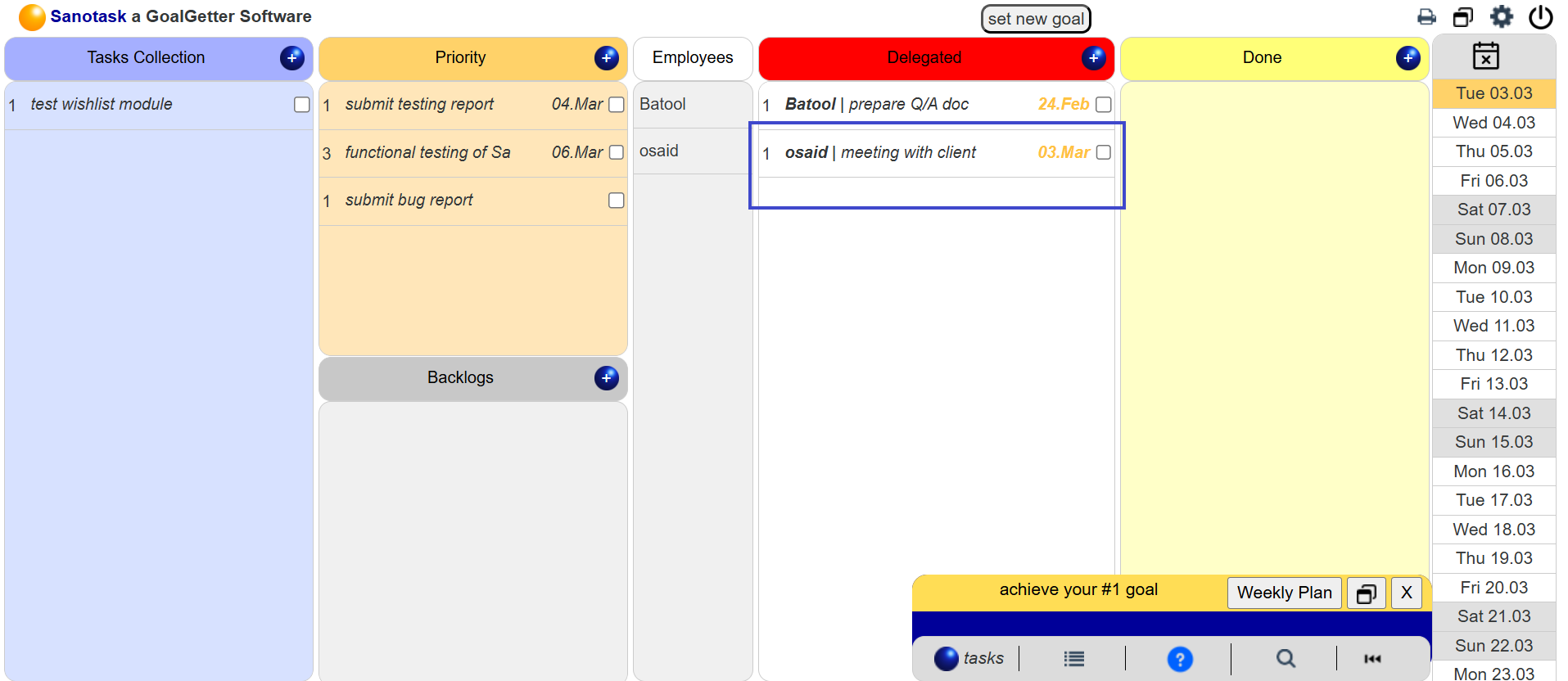
- Drag a task onto a team member’s name to assign it.
- The assigned task automatically appears in the employee’s workspace.
- Managers can track task progress from their own dashboard.
This simple drag-and-drop delegation makes team coordination fast and intuitive.
How the Manager Dashboard Works
Tasks move through different sections as they progress:
- Backlog / Grey Area: Tasks that do not yet have a due date.
- Scheduled / Orange Area: Tasks with assigned due dates.
- Today’s Work / Red Area: Tasks planned for today’s execution.
- Done Area: Completed tasks that have been finished.
This structure allows managers to quickly understand what work is pending, scheduled, or completed.
Employee Privacy and Independent Workspaces
Each employee has their own Sanotask workspace and database.
- Managers cannot see the employee’s full board.
- Employees can create private tasks that remain hidden from managers.
- Managers only see the tasks that they have assigned.
This ensures team coordination without compromising personal task privacy.
Team Setup and Permissions
To enable the Manager Dashboard, employees must grant permission to their manager.
- The manager shares their Manager ID.
- The employee enters this ID in the Team settings.
- Once permission is granted, the manager can assign tasks to that employee.
This permission-based system ensures secure collaboration between managers and team members.
Track Task Completion
When an employee completes a delegated task, it appears in the manager’s dashboard as completed.
The manager can review the work and confirm completion before the task moves to the archive.
This workflow ensures that every delegated task is properly reviewed and tracked.